
At some point, almost everyone in Pakistan has stared at their phone wondering who just called. Maybe it was a missed call with no follow-up message. Maybe it was someone insisting you owe money to a bank you have never used. Maybe it is a number your child has been texting that you do not recognize.
The question — who owns this SIM? — is one of the most common digital searches in Pakistan. And while there is no single magic button that instantly reveals every detail about a SIM owner, there are several legitimate, accessible, and often free tools that get you quite far.
This guide covers all of them. By the end, you will know exactly how to check Pak SIM owner details online, what each method can and cannot tell you, and where DB Center fits into the picture when official channels need a complement.
Why Checking SIM Owner Details Matters in Pakistan
Pakistan crossed the 190 million mobile subscriber mark a few years ago. That is a lot of SIM cards — and a lot of potential for confusion, fraud, and misuse.
The demand for SIM ownership checks has grown alongside the telecom sector itself. Here are the situations that bring most people to this search:
Unknown missed calls. You see a number you do not recognize, there is no voicemail, and calling back feels risky. This is the most frequent reason by far. A quick ownership check helps you decide whether to respond or ignore.
Scam and fraud calls. Phone scams in Pakistan have become more sophisticated. Callers impersonate bank officials, NADRA staff, courier companies, and even law enforcement. Verifying a number before you engage can save you from serious financial or personal harm.
Harassment through calls or messages. If someone is repeatedly calling or messaging you in a threatening or disturbing way, knowing who owns that SIM is a necessary step before involving the authorities.
Buying or selling through online platforms. Pakistan’s online marketplace — from OLX to Facebook Marketplace to WhatsApp groups — is massive. When you are about to hand over money to a stranger whose only contact detail is a mobile number, checking what you can about that number is just sensible.
Verifying a new employee or tenant. Employers, landlords, and business owners routinely check SIM ownership as part of informal background verification in Pakistan.
Protecting your own CNIC from SIM misuse. If someone has fraudulently registered a SIM in your name, that SIM could be used to bypass two-factor authentication on your bank accounts or other services. Periodic checks protect you from this risk.
How SIM Ownership Registration Works in Pakistan
Every SIM card sold in Pakistan must be registered under a valid CNIC through a biometric verification process. This has been mandatory since PTA launched the biometric SIM verification drive starting around 2012 and completing it comprehensively in the years that followed.
When you purchase a SIM from any franchise — whether Jazz, Telenor, Zong, Ufone, or SCO — the franchisee scans your CNIC, verifies your fingerprint against NADRA’s national database, and the SIM is then officially registered to your identity. No biometric match, no SIM.
This system means every legally sold SIM in Pakistan has a traceable owner. The challenge is that this information is held in secure government and telecom databases, and public access to it is appropriately restricted. You cannot simply type a number into a government portal and get back someone’s full name and home address — and you should not be able to.
What you can do, through the right channels, is verify your own registrations, confirm whether a CNIC is valid, cross-check identity through official complaints, and use reverse phone lookup tools for publicly available number information.
Free Method 1: PTA’s SMS Service to Check SIM Registrations
This is the most widely used free method in Pakistan, and it works immediately.
Open your messages app and send your CNIC number — written without dashes — to 668.
PTA will reply with a list of all SIM cards currently registered under your CNIC. The message tells you which network each SIM belongs to and the registered number.
This service is free, available around the clock, and works on every major Pakistani network. It is the fastest way to answer the question of how many SIMs are active under your own identity.
Why is this relevant when you are trying to check someone else’s number? Because it is the foundation of the whole system. If you have a reason to suspect a specific number may be registered on your CNIC without your permission, this check will confirm or clear that suspicion immediately.
If you find a SIM you do not recognize in the reply, do not wait. Report it to PTA at their helpline (0800-55055) and to the network operator, and request deregistration. An unauthorized SIM on your CNIC is a live security risk.
Free Method 2: PTA’s Complaint Portal for Specific Numbers
When you want to know about a specific number that has been bothering you, PTA’s official complaint portal is the formal free route.
Visit pta.gov.pk and navigate to the consumer complaint section. You can submit a complaint about any number involved in spam, harassment, fraud, or unsolicited calls. You will need to provide the number, describe the issue, and include any evidence you have such as screenshots or call logs.
PTA processes these complaints and takes action on verified reports. Operators are required to cooperate with PTA investigations, which means persistently problematic numbers do get blocked or flagged.
This method does not give you the owner’s name on the spot. What it does is set a formal process in motion that carries real consequences for whoever owns the number. For harassment and scam situations, this is often the most effective long-term response.
PTA also publishes aggregated data about spam and blocked numbers, which feeds into services like DB Center that track reported numbers over time.
Free Method 3: Telecom Operator Helplines
Each Pakistani network has a customer service channel you can contact about specific number concerns. While operators will not hand over another customer’s personal data directly, they do handle escalations for harassment and fraud.
The major network helplines are:
Jazz customers can call 111 or dial 0300-1111111 from any number. Telenor users reach support by calling 345 or 0345-7000345. Zong has a helpline at 310 for in-network calls. Ufone’s support line is 333 from a Ufone number or 0333-1111333 from others. SCO varies by region but maintains district-level service centers.
If you are receiving harassing calls from a specific number, call the operator on whose network the number appears to run (you can usually identify this from the prefix) and file a harassment report. Operators have internal security teams that can flag numbers, escalate to PTA, and in serious cases work with law enforcement.
For business users dealing with suspected fraud, most operators have separate business support lines that handle complaints with more urgency than standard consumer channels.
Free Method 4: NADRA Verisys for Identity Cross-Checking
NADRA’s Verisys portal at verisys.nadra.gov.pk is not a phone number lookup tool, but it works as a powerful complement to one.
Here is the use case: someone gives you their phone number and their CNIC for a transaction, rental agreement, or job application. You can use Verisys to verify that the CNIC is genuine and that the name on it matches what they told you. Separately, you can check whether the number they gave you carries the same name through other channels.
Verisys confirms name, date of birth, and whether the CNIC is active. It does not display photos or full addresses publicly. For basic identity confirmation — “is this person who they say they are?” — it is a strong, free first step.
This cross-referencing approach is now standard practice among experienced property dealers, HR managers at small businesses, and anyone regularly dealing with new individuals in high-value transactions.
Using DB Center for Reverse Phone Lookup
When you have a number and nothing else — no name, no CNIC, no context — DB Center is one of the most practical free tools available.
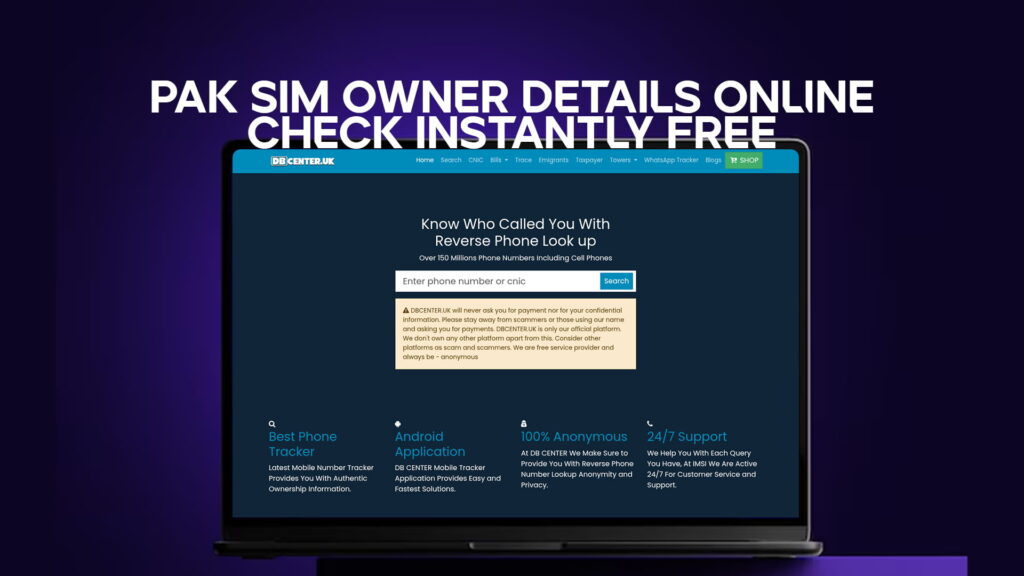
DB Center is a reverse phone lookup service carrying a database of over 150 million phone numbers, including mobile numbers. You enter the number, and the system returns whatever publicly available information is associated with it. This can include a registered name, the general area the number is linked to, and the carrier.
For Pakistani users specifically, this fills a real gap. Official government tools are excellent for your own registrations and formal complaints, but they are not designed for the casual, everyday question of “who just called me from this number?”
DB Center is. It is fast, accessible, and does not require you to file a formal complaint or visit any office. You search, you see what is available, and you decide what to do next.
Several situations where DB Center is particularly useful in a Pakistani context:
You receive a call from a number claiming to be a bank, utility company, or government office. Before you engage, you check the number on DB Center. If it returns as a reported scam number or is not associated with the institution the caller claimed, that is your answer.
You are buying something from an online seller who has only shared a mobile number. Running that number through DB Center before transferring any money gives you an independent data point on who you are dealing with.
You keep getting WhatsApp messages from a number you do not know, and the person is asking for personal information. A reverse lookup can confirm whether the number is known, what it is linked to, and whether other users have flagged it.
DB Center works alongside official Pakistani channels, not as a replacement for them. For confirmed fraud or threats, PTA and FIA’s Cybercrime Wing remain the right escalation path. But for the everyday situation — unknown caller, unverified contact, suspicious message — DB Center covers the gap quickly and for free.
What You Can and Cannot Find Out
Being clear about this saves time and prevents frustration.
Through free official channels — PTA’s 668 SMS and NADRA Verisys — you can check your own SIM registrations, confirm a CNIC’s validity, and initiate formal complaints about specific numbers. These are your strongest tools, but they do not give you a stranger’s full personal profile.
Through DB Center’s reverse phone lookup, you can find a name or business associated with a number, the general location or region, the carrier, and whether the number has been reported by other users. Coverage varies by number and region, but the database is substantial at 150 million-plus entries.
What no legitimate service provides: a stranger’s complete personal details including full CNIC number, home address, and financial information. Any website or service claiming to offer this for Pakistani numbers should be treated with serious skepticism — either the data is fabricated, obtained illegally, or the site itself is a scam.
Working within legitimate tools gives you reliable, actionable information. Working outside them risks both the accuracy of what you find and your own legal standing.
How to Identify Scam Numbers Before They Reach You
Most scam calls in Pakistan follow recognizable patterns. Knowing them is half the battle.
The caller creates urgency. They tell you your bank account has been compromised, your CNIC has been flagged, or a parcel is being held. The message is always: act now, do not delay.
The caller asks for sensitive information. A legitimate bank, NADRA office, or courier company will never ask for your PIN, OTP, full CNIC number, or account password over an unsolicited call.
The number does not match the institution’s official number. If someone calls claiming to be from a specific bank, check that bank’s official contact number on their website. Official calls come from official, published numbers — not random mobile numbers.
Before responding to any call that triggers these warning signs, run the number through DB Center. If it returns as a reported scam, you have your answer. If it returns as something unrelated to the caller’s claimed identity, that is also a red flag.
Steps to Take If Your SIM Is Being Misused
If you discover through your PTA 668 check that a SIM has been registered on your CNIC without your knowledge, here is what to do:
Step one. Note down the number and the network it belongs to from the PTA reply message.
Step two. Call PTA’s helpline at 0800-55055 and report unauthorized SIM registration. They will guide you through the formal complaint process.
Step three. Contact the relevant network’s customer service and request emergency deregistration of the unauthorized number.
Step four. Visit a NADRA office or E-Sahulat center to flag the issue on your identity record. Ask them to note the unauthorized use in your file.
Step five. If you suspect the SIM has been used for financial fraud — for example, to intercept bank OTPs — contact your bank’s fraud team immediately and freeze any affected accounts while the investigation proceeds.
Acting fast matters here. The longer an unauthorized SIM remains active, the more damage it can potentially do.
Several methods are genuinely free or very low-cost. PTA’s SMS service to 668 charges a small standard SMS fee but returns your SIM registration details within seconds. NADRA’s Verisys portal is free for basic CNIC verification. DB Center’s reverse phone lookup is accessible online at no charge. For formal complaints via PTA or the telecom operators, there is no fee. The main investment is time rather than money.
Not through official government databases — those are restricted to protect privacy. What you can do is use DB Center’s reverse phone lookup, which searches publicly available records and may return a name or business associated with the number. For serious matters like harassment or fraud, you can file a formal complaint with PTA or FIA’s Cybercrime Wing, and they have the authority to access full registration details through proper legal channels.
Start with DB Center’s reverse phone lookup — it is the fastest free option for checking publicly available information about a specific number, including whether other users have flagged it as spam or fraud. Follow that with a PTA complaint if the number has been actively harassing you. PTA maintains a record of reported numbers and takes enforcement action on confirmed spam and fraud cases.
Send your CNIC number (without dashes) to 668 via SMS. PTA will reply with a list of all SIM cards registered under your identity. If you see any numbers you do not own or recognize, report them immediately to PTA at 0800-55055 and to the relevant network operator. This check should be done at least twice a year as a routine precaution.
Yes. DB Center’s database covers over 150 million phone numbers including mobile numbers, and it includes numbers from Pakistan. The depth of available information varies by number — some return detailed results, others return carrier and region only. For commonly reported or business-registered numbers, results tend to be more complete. It is most effective as a first-line check before you decide whether to respond to an unknown number or escalate through formal channels.
Final Thoughts
Checking Pak SIM owner details online does not require technical expertise or connections in high places. The tools are already there — PTA’s SMS service, NADRA’s Verisys portal, operator helplines, and DB Center’s reverse phone lookup covering over 150 million numbers.
The key is knowing which tool suits which question. For your own SIM registrations, 668 is the fastest free answer. For identity cross-checking on someone you are dealing with directly, NADRA Verisys covers the CNIC side. For the everyday unknown number — missed call, suspicious message, unverified seller — DB Center gives you a quick, accessible starting point.
Used together, these tools handle the vast majority of situations people in Pakistan actually face. They will not give you a stranger’s complete personal profile, and that is the right boundary to have. But within what they do offer, they are reliable, free or low-cost, and genuinely useful.
Your phone is central to your financial and personal life in Pakistan today. Knowing who is on the other end of an unknown number is a reasonable thing to want. Now you know how to find out.